
Coding may sound like a grown up skill, yet its first steps are simple and playful. Young children learn to give instructions in order, spot patterns, and fix small mistakes when a plan does not work. The best coding toys for preschoolers turn those ideas into movement, stories, and games, so a child can build early logic while playing on the floor with family. No reading is required for most of the options in this guide, and no prior tech knowledge is needed at home.
Many parents start with screen free coding toys because they keep learning active and social. Children press buttons, arrange tiles, or move a small robot across a mat, then watch the result right away. That instant feedback helps them connect each instruction with what happens next. You can find more early learning ideas in our Educational and Learning Toys category, which groups playful tools that build thinking skills through everyday play.
This guide explains what to look for, then reviews ten trusted options from well known brands, from simple first robots to family board games. By the end, you will know which coding toys for preschoolers fit your child, your space, and your home routine.
Quick Picks
If you need a fast answer, start with these five coding toys for preschoolers. Each one teaches sequencing in a clear way, works without reading, and suits a slightly different kind of learner.
- Learning Resources Botley 2.0: Best overall robot with simple remote control coding and obstacle play.
- Primo Cubetto: Best wooden option for calm, screen free play and gentle storytelling.
- Fisher-Price Code-a-Pillar Twist: Best first choice for younger preschoolers who love pressing and turning dials.
- ThinkFun Robot Turtles: Best family board game that teaches planning without any device.
- Osmo Coding Starter Kit: Best choice for families who already enjoy tablet based play together.
How to Choose coding toys for preschoolers With Confidence
Start With Age and Reading Level
The best coding toys for 4 year olds use pictures, arrows, and sounds instead of written words. A child only needs to understand forward, back, left, and right in a simple way. When you compare coding toys for preschoolers at this age, look for big buttons, short play sessions, and clear results after each instruction. Coding toys for 5 year olds can add longer sequences, simple challenges, and early ideas about loops and planning ahead.
Think about patience as well as age. Some children enjoy repeating a route until it works, while others prefer free play with no set goal. Start with the simplest mode, let your child lead, and add new steps only when the first steps feel easy and fun.
Choose Screen Free Play or a Guided App
Robots, tiles, and board games keep the focus on movement and conversation. Tablet based kits can add music, stories, and gentle prompts that some children love. Neither approach is better for every family. What matters is that your child stays active in the play, making choices and talking through ideas instead of only watching a screen. Our guide to a baby learning toy shows how active play supports early development.
Also consider your home routine. A screen free set can come out at the table in minutes, while an app based kit needs a charged device. If siblings play together, choose a toy that supports turn taking and quick resets.
Look for Growth, Replay Value, and Simple Controls
Good beginner coding kits for kids grow in small steps. Early challenges use three or four instructions, and later ones ask for longer plans and problem solving. That steady growth is what makes coding toys for preschoolers worth keeping beyond the first week. Check that pieces are sturdy, controls respond clearly, and the toy still feels fun when a route goes wrong. Mistakes should feel like part of the game, never like failure.
Our Top Picks for coding toys for preschoolers
The ten picks below cover friendly robots, wooden sets, board games, and preschool robotics toys that young children can understand. Each review explains how the toy teaches, what comes in the box, and who it suits best.
1. Learning Resources Botley 2.0 The Coding Robot
Botley 2.0 is a friendly floor robot that children code with a simple remote programmer. Each button press adds one step, and Botley follows the full sequence with movement, lights, and sounds. The set includes obstacle pieces and coding cards that help adults set up small challenges, such as guiding Botley around a cone or through a mini course. Because there is no screen and no app, play stays focused on planning, watching, and trying again when a route needs a fix.
- Remote programmer with clear direction buttons for each step
- Coding cards that show each sequence in picture form
- Obstacle pieces and detachable arms for creative challenges
- Fun modes with lights, sounds, and a night play glow
Pros: Very easy first robot, strong replay value, and no screen needed. Cons: Needs batteries and open floor space for longer routes. It suits children who love movement and want a robot that reacts right away to their ideas.
2. Primo Cubetto
Cubetto is a calm wooden robot that moves across a fabric map in response to colorful blocks placed on a control board. Each block stands for one action, such as forward or turn, and children build a line of blocks to plan a journey. The wooden materials feel warm and sturdy, and the gentle pace suits story based play, where Cubetto can visit places on the map. It is a lovely choice for families who value quiet, thoughtful play without lights and noise.
- Solid wooden robot and control board with a natural feel
- Color coding blocks that stand for direction and function
- Fabric world map that supports storytelling and imagination
- No screen, no words, and no app required for play
Pros: Beautiful build quality, calm pace, and strong focus on planning. Cons: Slower action may not hold very energetic children for long. It suits gentle learners who enjoy stories, maps, and building a plan one block at a time.
3. Fisher-Price Think and Learn Code-a-Pillar Twist
Code-a-Pillar Twist is a caterpillar shaped robot with five dials along its body. Children turn each dial to choose a direction or sound, press the head, and watch the caterpillar move through the full plan. The dial format is easy for small hands, and each segment lights up as its step plays, which helps children follow the order of their choices. It feels more like a musical toy than a lesson, yet it teaches sequencing, counting steps, and cause and effect in a very natural way.
- Five easy turn dials for movement and sound steps
- Light up segments that show each step as it plays
- Chunky body that is simple for small hands to hold
- Motorized movement that works on most hard floors
Pros: Simple dials, cheerful lights and sounds, and no loose pieces to track. Cons: Sequences stay fairly short, so older preschoolers may outgrow it sooner. It suits younger children exploring coding toys for preschoolers for the very first time at home.
4. Learning Resources Coding Critters
Coding Critters pairs a small coding robot pet with a storybook adventure. In the best known set, children help Scamper the cat or Sneaker the dog follow the story by pressing direction buttons in the right order. Play pieces such as a slide, a house, and food bowls turn each challenge into pretend play. There is also a play mode where the pet reacts with sounds and movement, which keeps the toy fun between story challenges and helps shy learners join in.
- Storybook with step by step coding challenges in pictures
- Cute robot pet with simple direction button coding
- Pretend play pieces that build a small pet world
- Play mode with sounds, movement, and personality
Pros: Story format keeps children engaged, and pretend play adds lasting value. Cons: Challenges are gentle, so confident five year olds may want more depth. It suits animal lovers who learn best when coding feels like helping a character on an adventure.
5. Matatalab Tale-Bot Pro
Tale-Bot Pro is a small round robot that reads coding commands from sturdy tiles placed in a sequence. Children arrange the tiles, press go, and the robot speaks and moves to show what each command means. Voice feedback is a real help for pre readers, because the robot says the direction out loud as it acts. Themed maps and stickers add storytelling, so a route can become a trip to a shop, a farm, or a friend. The tiles are large, colorful, and easy to sort after play.
- Hands on coding tiles that are easy to arrange and read
- Spoken feedback that names each command as it plays
- Double sided activity maps for story based routes
- Rechargeable design with washable drawing and sticker fun
Pros: Voice guidance supports pre readers, and maps make lessons feel like stories. Cons: Spoken sounds may feel busy in a quiet room. It suits children who learn by listening and talking through each step before the robot moves.
6. ThinkFun Robot Turtles
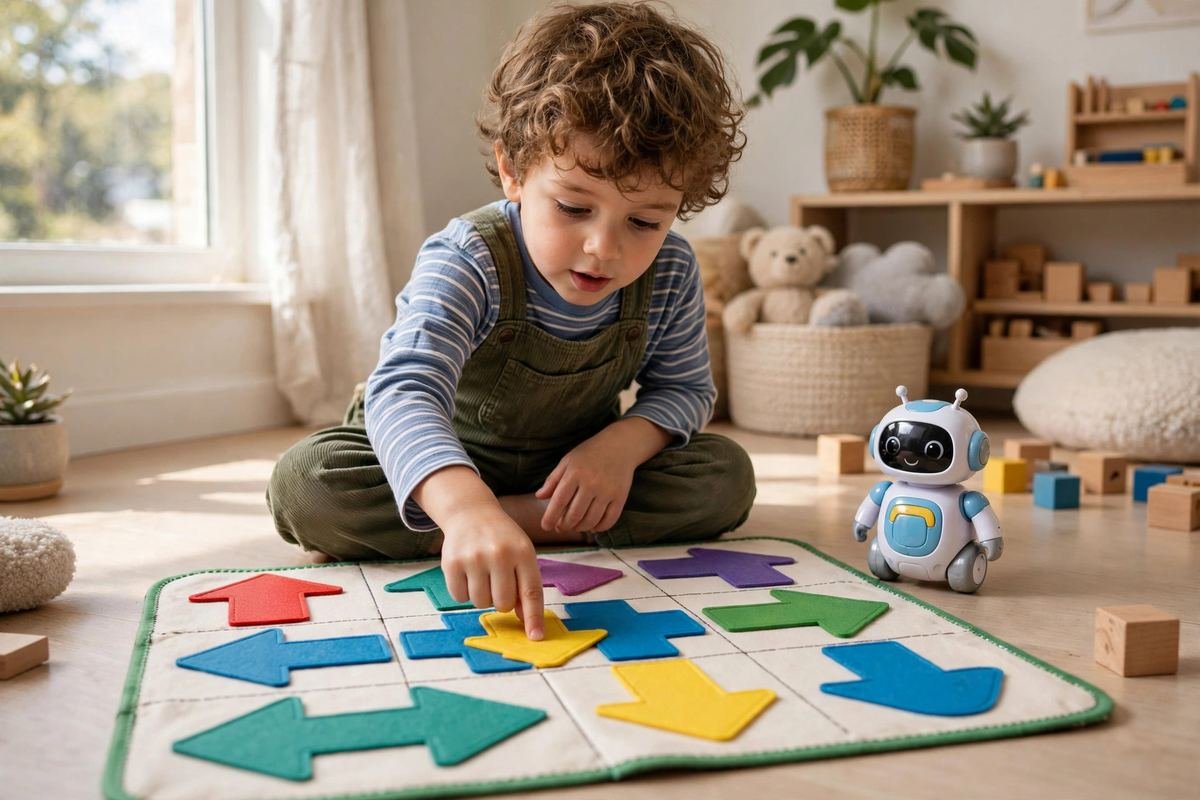
Robot Turtles is one of the best known coding board games for kids, created to teach programming ideas through family play. Each child moves a turtle across the board toward a jewel by playing instruction cards for forward steps and turns. An adult acts as the computer, moving the turtles exactly as the cards say, which leads to funny mistakes and lots of discussion. Obstacle cards and unlockable features add depth over time, so the game can grow from simple routes to careful multi step planning.
- Instruction cards that teach sequencing without any screen
- Colorful board and turtle pieces for up to four players
- Obstacle and feature cards that add new challenges gradually
- Adult guide that explains how to run the game simply
Pros: Social, funny, and excellent for planning and discussion as a family. Cons: Needs an adult to run the game, especially at first. It suits families comparing coding toys for preschoolers who enjoy board games and learning together around a table.
7. Osmo Coding Starter Kit
The Osmo Coding Starter Kit combines physical coding blocks with a tablet based game world. Children snap blocks together to guide a character named Awbie through adventures, collecting treats and solving small puzzles along the way. The kit is often used as one of the richer stem coding toys for kindergarten readiness, because it blends logic with counting, shapes, and music in companion games. An adult should help with setup, and play works best in short shared sessions where you talk about each plan together.
- Physical coding blocks that join with simple magnets
- Three learning games covering coding, drawing, and music
- On screen character that responds to every block change
- Base and reflector that work with a compatible tablet
Pros: Rich game world, strong variety, and blocks make screen play active. Cons: Needs a compatible tablet, which not every family wants to share. It suits children who enjoy stories and music and who respond well to gentle on screen prompts.
8. Sphero indi
Sphero indi is a small car shaped robot that reacts to colored tiles placed on the floor. Each color tells indi to speed up, slow down, turn, or celebrate, so children design a route by laying tiles in a path and driving over them. There are no buttons to program at first, which makes the idea very clear: change the tile, change the action. Challenge cards suggest puzzles with a start and finish, and free building lets children invent tracks, towns, and races with blocks and toys they already own.
- Color tiles that control speed, turns, and celebrations
- Durable car design made for floors and classroom style play
- Challenge cards with simple puzzles and clear goals
- Beginner app option for families who later want more control
Pros: Tile logic is easy to grasp, and the car format feels exciting. Cons: Large tile layouts need a good amount of floor space. It suits active builders who like designing tracks and testing how each small change affects the journey.
9. Makeblock mTiny
mTiny is a panda themed robot that children guide with a tap pen controller and coding cards. Tapping cards in order builds a program, and mTiny follows it with movement, sounds, and expressive eyes. Emotion cards and music cards add feelings and tunes to a route, which makes coding feel warm and personal rather than purely technical. Puzzle books and a large map give structure for beginners, while free play lets children invent dances and journeys. The soft panda design is especially welcoming for children who feel unsure about robots.
- Tap pen controller that reads coding cards with a touch
- Panda robot with sounds, music, and expressive reactions
- Puzzle book and map for guided early challenges
- Emotion and music cards that support storytelling play
Pros: Gentle character design, rich storytelling tools, and clear tap to code action. Cons: Many cards to keep organized between play sessions. It suits creative children browsing coding toys for preschoolers who want music, feelings, and stories woven into every route.
10. TTS Bee-Bot
Bee-Bot is a cheerful bumblebee robot used in early years settings around the world. Children press clear buttons on its back for forward, back, left, and right, then press go and watch the plan unfold one step at a time. Its simple design is the point: there is nothing extra to distract from sequencing and direction. Bee Bot works well with printed mats, number lines, and story maps, and groups of children can take turns adding one step each, which builds listening and teamwork.
- Large back buttons with clear direction symbols
- Simple memory for a useful sequence of steps
- Sturdy shell designed for busy early years play
- Works with many mats for numbers, letters, and stories
Pros: Very clear controls, proven classroom style design, and great for group turns. Cons: Fewer playful extras than character based robots at home. It suits children who thrive on simple routines and families who want focused practice with direction and order.
Safety and Care
Always follow the maker age guide and check a toy before each play session. Look for loose wheels, cracked tiles, and battery covers that close firmly. Adults should handle charging and battery changes, and button batteries must always stay out of reach. The U.S. Consumer Product Safety Commission shares clear toy safety guidance for families. Supervised play matters most with coding toys for preschoolers that include small cards, tiles, or charging cables in the box.
Care is simple for most sets. Wipe robots and tiles with a soft, slightly damp cloth and let them dry fully before storage. Keep maps and cards flat so they do not bend. Our ideas for baby toy storage can help you keep small learning pieces together and ready for the next session.
Frequently Asked Questions
At what age can a child start coding play?
Many children can start simple sequencing play around age three or four, as long as the toy uses pictures and buttons instead of words. Begin with two or three steps, celebrate effort, and stop while play still feels fun. Short, happy sessions with coding toys for preschoolers build confidence far better than long sessions that end in frustration for everyone.
Do preschoolers need a tablet to learn coding ideas?
No. Sequencing, patterns, and problem solving can all be learned with robots, tiles, cards, and board games. A tablet kit can add stories and music, but it is optional. Choose the format your family will actually use often, because regular short play matters more than having the most advanced kit in the cupboard.
How long should a coding play session last?
For most preschoolers, ten to twenty minutes is a good guide. Follow your child’s lead and finish a session while interest is still high. You can leave a robot or game set up and return later in the day. Returning to an unfinished route often sparks fresh ideas and shows children that thinking can pause and restart.
Can siblings of different ages play together?
Yes, with a little structure. Let the younger child place tiles or press go, while an older child plans longer routes or reads challenge cards aloud. Taking turns keeps everyone involved. Many coding toys for preschoolers work well this way because the basic steps are simple, yet longer challenges still interest older brothers and sisters.
What skills does coding play build besides tech skills?
Coding play builds patience, planning, and clear communication. Children learn to break a big goal into small steps, describe what they want to happen, and stay calm when a plan needs a change. These habits also support maths, storytelling, and everyday problem solving at home and at school.
Conclusion
The right first coding toy feels like a game, not a lesson. Match the format to your child: a robot for movement lovers, a board game for family talk, or tiles and stories for calm planners. Start simple, play together, and let mistakes become part of the fun. With patient practice and plenty of encouragement, coding toys for preschoolers can build logic, language, and confidence that support learning long after the robot stops moving.
